
AI Blogs

Google Photos Video Remix: AI Video Editing Made Easy (2026)

August 2, 2026
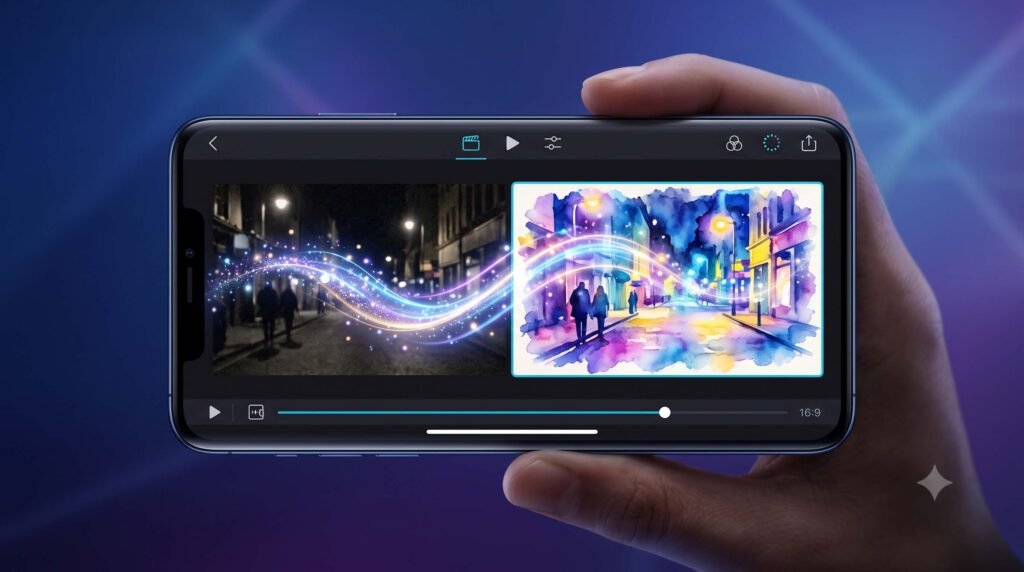
Editing a video used to mean downloading a separate app, learning timelines and sliders, and losing an hour of your day. Google just removed all of that friction. Google Photos Video Remix, launched on July 8, 2026, is a new AI tool that transforms ordinary video clips into stylized, share-ready moments in a few taps. In this guide, you’ll learn what Video Remix is, its key features, who it’s for, what it costs, and how to start using it today.
What Is Google Photos Video Remix?
Video Remix is an AI-powered video editing feature built directly into the Google Photos app. Instead of manual editing controls, it gives you a library of ready-made templates that automatically restyle your existing clips — think turning a birthday video into a watercolor painting, or brightening a dark concert clip with cinematic lighting.
The feature runs on Gemini Omni, Google’s newest multimodal AI model designed to create content from almost any type of input. In plain English: you pick a video, tap a template, and the AI does the editing work that would normally require professional software.
You’ll find Video Remix inside the Create tab of Google Photos — the same hub that houses Photo to Video, Collages, and the image version of Remix. According to Google’s official announcement, edits are processed in seconds, no editing skills required.
Key Features of Video Remix
Key Features of Video Remix — Automatically brightens dark or poorly lit clips and balances shadows, so that dim birthday or concert footage looks properly exposed.
Background swapping — Replaces a plain or boring background with something more interesting, using templates like placing your video inside a greenhouse.
Artistic style effects — Converts your clip into watercolor, raw sketchbook, or oil painting styles for a completely different visual mood.
Template-based editing — No sliders, timelines, or color wheels. Every effect is applied through a simple library of one-tap templates.
Digital avatar insertion — The underlying Gemini Omni model can place a digital avatar of you into a video, with every AI edit watermarked using Google's SynthID technology for transparency.
Fast processing — Google says a template prompt produces the edited video in just a few seconds.
Advantages of Video Remix
Pros
- Zero learning curve. If you can tap a template, you can use it — a huge win for beginners who find apps like Premiere Pro or CapCut intimidating.
- Built into an app you already use. There's nothing new to download; it lives inside Google Photos, where your videos already are.
- Genuinely useful fixes, not just gimmicks. Cinematic relighting solves a real everyday problem: dark, unusable phone footage.
- AI transparency by default. SynthID watermarking means AI-edited content can be identified later, which matters as AI media spreads.
Cons
- It's not free. Video Remix requires a paid Google AI Plus, Pro, or Ultra subscription, so free-tier Google Photos users are locked out.
- Limited availability. At launch it's rolling out only in 14 countries, and only to adult users.
Who Should Use Video Remix?
- Families — Fix dark clips of birthdays, dinners, and school events before sharing them in the family group chat.
- Students — Add artistic effects to project videos or campus memories without learning editing software.
- Content creators — Quickly generate stylized short-form clips for Reels, Shorts, or TikTok when speed matters more than fine control.
- Travelers — Turn ordinary trip footage into watercolor or oil-painting keepsakes worth posting.
- Small marketers — Restyle simple product or behind-the-scenes clips into eye-catching social content without hiring an editor.
- Casual social media users — Add a fun filter to a pet video in seconds instead of opening a separate app.
Pricing and Availability
Video Remix itself has no standalone price — access depends on your Google AI subscription tier.
Note: Google is rolling the feature out gradually, so even eligible subscribers may not see it immediately.
| Detail | Information |
|---|---|
| Launch date | July 8, 2026 |
| Where to find it | Create tab in Google Photos |
| AI model | Gemini Omni |
| Required plan | Google AI Plus, Pro, or Ultra |
| Free tier access | ❌ Not available |
| Launch countries | US, India, Japan, Brazil, Mexico, South Korea, Indonesia, Philippines, Pakistan, Bangladesh, Egypt, Turkey, Colombia, Argentina |
| Age requirement | Adults (18+) |
How to Use Video Remix in Google Photos
Update Google Photos to the latest version on your Android or iOS device.
Confirm your subscription — you need an active Google AI Plus, Pro, or Ultra plan.
Open the Create tab at the bottom of the Google Photos app.
Select Video Remix from the available creative tools.
Pick a video clip from your library.
Choose a template — relighting, background swap, or an artistic style like watercolor.
Wait a few seconds for Gemini Omni to process the edit, then preview, save, or share your remixed clip.
Frequently Asked Questions
Q1. Is Video Remix free in Google Photos?
No. Video Remix is only available to paid Google AI Plus, Pro, or Ultra subscribers. Free Google Photos users cannot access the feature at launch, although Google often expands features to more tiers over time.
Q2. How do I use Video Remix in Google Photos?
Open the Create tab in the Google Photos app, select Video Remix, choose a clip from your library, and tap a template. The Gemini Omni model applies the effect automatically within seconds — no manual editing needed.
Q3. Which countries have Google Photos Video Remix?
Video Remix launched in 14 countries: the US, India, Japan, Brazil, Mexico, South Korea, Indonesia, the Philippines, Pakistan, Bangladesh, Egypt, Turkey, Colombia, and Argentina. Google says the rollout is gradual, so availability may take a few weeks even in supported regions.
Q4. What AI model powers Video Remix?
Video Remix runs on Gemini Omni, Google’s multimodal model built to generate content from a wide range of inputs. It succeeds earlier tools like Nano Banana and the Veo video generator and better understands real-world physics for more natural results.